
Download SuperEasy Mouse Tracker – Mouse Tracker, Mouse Movement, Cursor Tracking, Productivity Tool, Statistics, Activity Monitoring
Overview
SuperEasy Mouse Tracker is a lightweight mobile application designed to monitor and record mouse cursor activity on a computer. The app functions as a simple utility that captures data related to mouse movement, including daily distance traveled and maximum speed achieved. While the tool does not require complex setup or technical knowledge, its purpose remains niche—offering users a way to track their computer interaction patterns through cursor behavior. It is particularly suited for individuals interested in self-monitoring digital habits or those exploring the nuances of human-computer interaction. The app may appeal to productivity enthusiasts, remote workers, or users curious about their digital footprints.
Despite its minimalistic design, SuperEasy Mouse Tracker serves as a functional tool within the broader ecosystem of productivity and digital wellness applications. It provides a unique lens into how users engage with their devices, offering insights that could inform better work habits or screen-time management. However, its practical utility is limited, as the collected data does not directly influence workflow efficiency or system performance. The developer, SuperEasy, has not provided additional background or technical details about the app’s development philosophy or intended use cases. Given its release date in 2012, the app reflects an early approach to behavioral tracking on mobile platforms, predating many modern digital wellness tools.
Key Features & Functionality
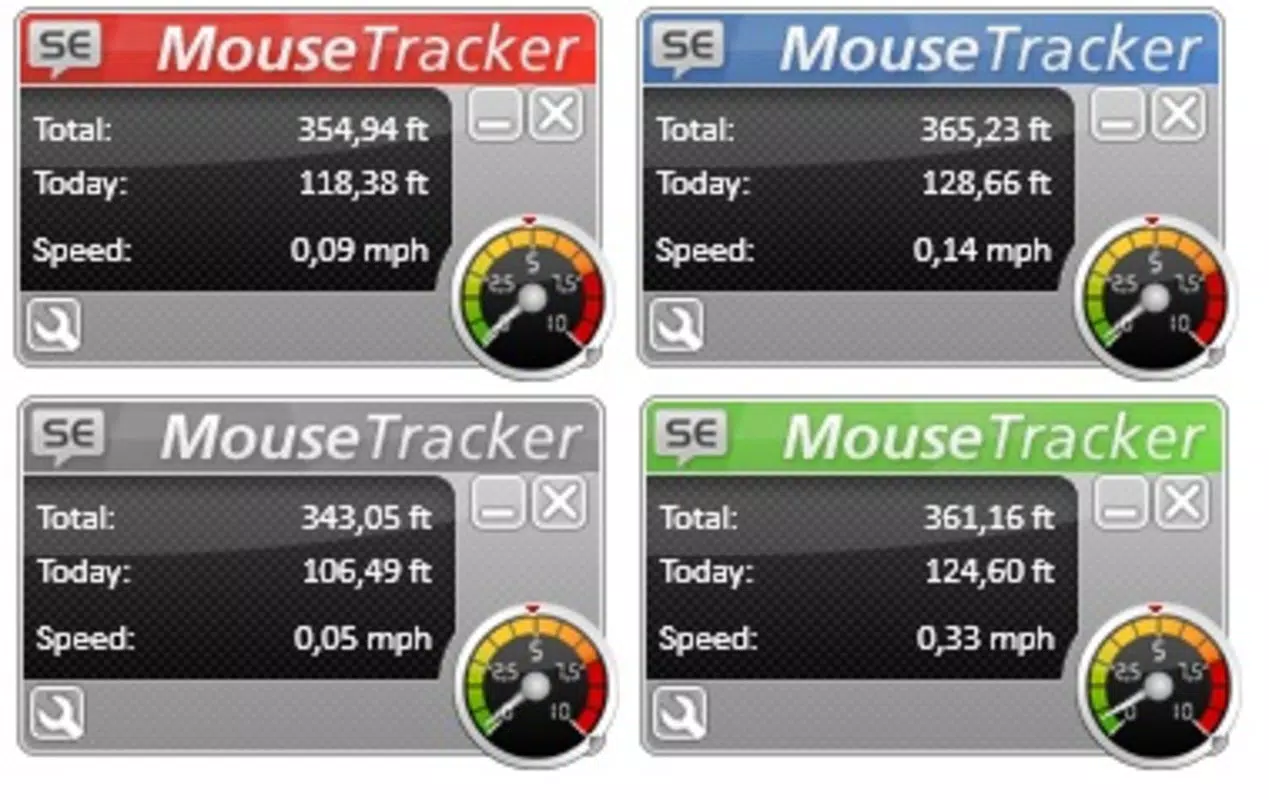
- Simple User Interface: The app features a clean, uncluttered interface that prioritizes readability and ease of access. With minimal visual distractions, users can quickly view core statistics without navigating through complex menus. This design makes it accessible even to users with limited technical experience.
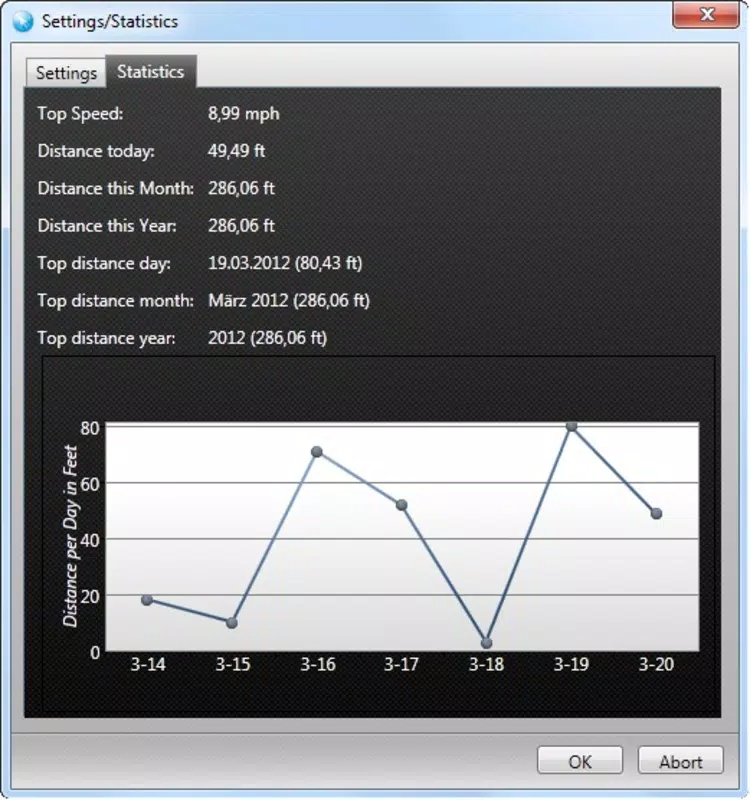
- Comprehensive Statistics: SuperEasy Mouse Tracker collects and displays key metrics such as daily distance traveled, peak speed, and longest recorded distance over a day or month. These figures are presented in a structured format, enabling users to track their mouse activity trends over time.
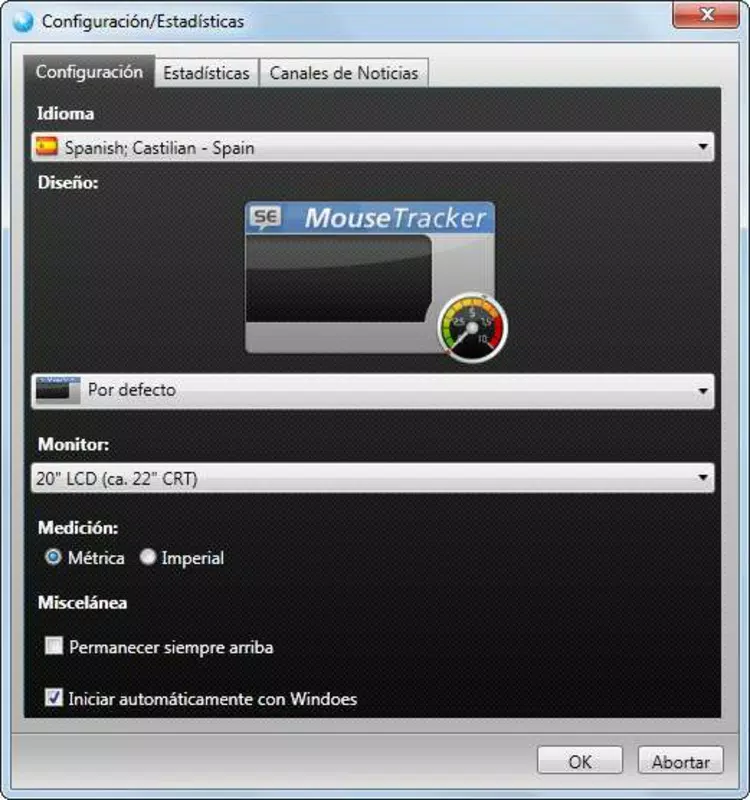
- Customizable Settings: Users can adjust measurement units (e.g., pixels, inches), modify interface colors, and set monitor size preferences. This limited personalization allows for a more tailored experience, enhancing usability for different screen environments.
- Graphical Representation: Each data point is accompanied by a visual graph, allowing users to interpret movement patterns intuitively. These visual aids help in identifying trends, such as spikes in activity during specific work hours or extended idle periods.
- Activity Monitoring: The app continuously tracks cursor movement, storing data for historical analysis. This feature enables users to review past behavior and reflect on their digital engagement patterns.
For example, a remote worker might use the app to analyze whether they are moving their mouse excessively during focused tasks, potentially indicating distraction or inefficient workflows. Similarly, a student could monitor their study sessions to assess engagement levels through cursor motion.
Interface, UX & Performance
SuperEasy Mouse Tracker presents a minimalist interface with a focus on clarity and functionality. The layout is straightforward, organizing data into clearly labeled sections that are easy to scan. Navigation is intuitive, relying on a linear flow that guides users from basic metrics to visual graphs. The app’s design avoids clutter, ensuring that users are not overwhelmed by unnecessary options or visual elements.
Although the developer did not list formal performance metrics, the app’s file size of 1.7 MB suggests it is optimized for low-resource environments. It is likely to run efficiently on a wide range of Android devices, including older models. Responsiveness appears to be consistent, with minimal lag during data updates or graph rendering. Stability is maintained through a lightweight architecture, reducing the risk of crashes or background interruptions.
Users can expect smooth interaction across different screen sizes and resolutions, though specific compatibility details were not disclosed. The app does not appear to consume significant system resources, making it suitable for long-term background operation without impacting device performance.
Platform Compatibility & Technical Requirements
SuperEasy Mouse Tracker is available exclusively on the Android platform. It is compatible with Android devices running the OS version specified in the app metadata. The current version is 1.2, with a file size of 1.7 MB, indicating a compact and lightweight design. The app is available at no cost, with no in-app purchases or subscription fees.
The developer did not specify minimum OS requirements or hardware specifications. As such, compatibility with newer or older Android versions cannot be confirmed. Users should ensure their device supports the app’s core functionality, particularly if attempting to connect with a computer via USB or network. The absence of detailed technical requirements means that installation and operation may vary depending on individual device configurations.
Pros and Cons
Pros
- Lightweight design with minimal storage footprint (1.7 MB)
- Simple, intuitive interface suitable for non-technical users
- Offers visual graphs for easy interpretation of mouse movement trends
- Customizable settings for measurement units and interface appearance
- Free to download and use with no hidden costs
Cons
- Practical utility of collected data is limited for most users
- Developer did not provide detailed technical specifications or system requirements
- Functionality is highly niche and may not appeal to general audiences
- App was released in 2012, raising concerns about long-term support and updates
- Compatibility with modern Android versions is uncertain
FAQ
Is SuperEasy Mouse Tracker safe to install?
Yes, the app is free and does not require excessive permissions. It operates as a lightweight utility with no known security risks. However, users should always download apps from trusted sources.
Can I use this app on iOS devices?
Currently, SuperEasy Mouse Tracker is only available on Android. There is no official iOS version available.
Does the app track mouse activity in real-time?
Yes, the app continuously monitors cursor movement and updates statistics in real-time, storing data for historical review.
Is the app compatible with all Android devices?
The developer did not specify minimum OS requirements. While the app is likely compatible with most Android devices due to its small size, compatibility with newer or older versions cannot be guaranteed.
How often does the app update?
There is no public information about update frequency. The last version released was in 2012, so regular updates are unlikely.
Final Thoughts
SuperEasy Mouse Tracker stands out as a rare example of a mobile app that bridges the gap between smartphone usage and computer interaction monitoring. While its practical value may be limited for most users, it offers a unique perspective on digital behavior through cursor tracking. The app’s minimalist design, clean interface, and visual analytics make it accessible and engaging for those interested in self-tracking or digital wellness. Its free availability and low resource usage further enhance its appeal.
However, the app’s age and lack of recent updates raise questions about long-term reliability and compatibility. Users should approach it with realistic expectations—this is not a productivity booster in the traditional sense, but rather a curiosity-driven tool. For individuals fascinated by data about their digital habits, or those exploring early forms of behavioral tracking, SuperEasy Mouse Tracker remains a noteworthy option.
Download SuperEasy Mouse Tracker now


